Nmap
Used To
- Find hosts
- Scan ports or detect firewalls
- Guess operating systems
- Find service, version and other relevant information
Syntax
nmap <scan type> <option> <target>
Find Hosts
- Use
-sP(old) or-sn(modern) to perform ping scan - It sends arp requests on local network and It sends ICMP Echo Request
-PE, TCP SYN-PSor TCP ACK-PAon IP layer host based discovery.
namp 192.168.1.0/24 -sn

Starting Nmap 7.94 ( https://nmap.org ) at 2026-07-30 18:05 AEST

Nmap scan report for 192.168.1.1 Host is up (0.0021s latency).
MAC Address: 3C:84:6A:12:34:56 (Cisco Systems)

Nmap scan report for 192.168.1.5 Host is up (0.0045s latency).
MAC Address: 70:85:C2:AB:CD:EF (Intel Corporate)

Nmap scan report for 192.168.1.10 Host is up (0.0018s latency).
MAC Address: 28:D2:44:98:76:54 (Apple)

Nmap scan report for 192.168.1.15 Host is up (0.0062s latency).
MAC Address: DC:A6:32:11:22:33 (Samsung Electronics)
Scan Multiple Hosts
- To find hosts from list add hosts in a file
cat hosts.txt

192.168.1.1
192.168.1.5
192.168.1.10
192.168.1.102
192.168.1.103
192.168.1.104
192.168.1.15
- Provide list with
-iLflag
nmap -sn -iL hosts.txt | grep "Host is up" | cut -d" " -f5

192.168.1.1
192.168.1.5
192.168.1.10
192.168.1.15
- Or provide multiple IPs separated by space
nmap -sn  192.168.1.10 192.168.1.102 192.168.1.103 192.168.1.15 | grep "Host is up" | cut -d" " -f5

192.168.1.10
192.168.1.15
- Or give range
nmap -sn  192.168.1.1-200 | grep "Host is up" | cut -d" " -f5

192.168.1.1
192.168.1.5
192.168.1.10
192.168.1.15
Scan Ports
- Nmap provides below status for scanned ports
| Status | Meaning |
|---|---|
| open | Connection to specified port is established |
| closed | Connection to specified port is not established |
| filtered | Nmap never reached the port (or the response never came back) due to firewall |
| unfiltered | Nmap can reach the port, but cannot find if port is open or closed. |
| open|filtered | Nmap cannot tell whether the port is open or filtered because there was no response that distinguishes the two (common with -sU) |
| closed|filtered | Nmap cannot tell whether the port is closed or filtered (common with -sO) |
- Provide
--reasonto see the reason behind port's status.
Scan all ports
- Use
-p-flag to scan all ports
nmap -p- 192.168.1.10
Scan specific ports
- Use -p and provide ports to scan
-p 20,80
nmap -p 20,80 192.168.1.10
Scan port range
- After
-pprovide range with starting port - last port
nmap -p 1-1000 192.168.1.10
Scan port with specific protocols
- Provide
T:<port>for TCP and-U:<port>for UDP after-pflag
nmap -p T:80,443,U:53 192.168.1.10
Exclude ports (--exclude-ports <ports>)
- Use
--exclude-portsflag to exclude ports
nmap -p- --exclude-ports 22,80 192.168.1.10
Scan top ports (--top-ports)
- Scans most common ports with
--top-portsand provide how many top ports to scan.
└─$ sudo nmap localhost --top-ports=5
Starting Nmap 7.99 ( https://nmap.org ) at 2026-08-08 06:28 -0400
Nmap scan report for localhost (127.0.0.1)
Host is up (0.000017s latency).
Other addresses for localhost (not scanned): ::1

PORT    STATE  SERVICE
21/tcp  closed ftp
22/tcp  open   ssh
23/tcp  closed telnet
80/tcp  closed http
443/tcp closed https

Nmap done: 1 IP address (1 host up) scanned in 0.05 seconds
Fast scan (-F)
- Use
-Fflag: scans first 100 top ports (same as--top-ports 100)
nmap -F 192.168.1.10
Aggressive Scan (-A)
-A enables several advanced detection features at once:
- OS detection (
-O) - Version detection (
-sV) - Default NSE scripts (
-sC) - Traceroute (
--traceroute)
sudo nmap -A 192.168.1.10


Starting Nmap 7.99

Nmap scan report for 192.168.1.10
Host is up (0.0020s latency).

PORT   STATE SERVICE VERSION
22/tcp open  ssh     OpenSSH 9.6p1 Ubuntu
80/tcp open  http    Apache httpd 2.4.58

|_http-title: Ubuntu Default Page

Device type: general purpose
Running: Linux 5.X
OS details: Linux 5.15 - 6.5

Network Distance: 1 hop

TRACEROUTE
HOP RTT     ADDRESS
1   2.01 ms 192.168.1.10

Service detection performed.
Nmap done: 1 IP address (1 host up) scanned
Packet tracing
- Used to see how packets were transferred (in this case
127.0.0.1:48891is attacker - since it is localhost and127.0.0.1:22is target)
└─$ nmap localhost --packet-trace -p 22
Starting Nmap 7.99 ( https://nmap.org ) at 2026-08-08 06:30 -0400
SENT (0.0222s) TCP 127.0.0.1:48891 > 127.0.0.1:22 S ttl=52 id=14697 iplen=44 seq=281968420 win=1024 <mss 1460>
RCVD (0.0222s) TCP 127.0.0.1:48891 > 127.0.0.1:22 S ttl=52 id=14697 iplen=44 seq=281968420 win=1024 <mss 1460>
RCVD (0.0222s) TCP 127.0.0.1:22 > 127.0.0.1:48891 SA ttl=64 id=0 iplen=44  seq=3763854722 win=65495 <mss 65495>
Nmap scan report for localhost (127.0.0.1)
Host is up (0.000030s latency).
Other addresses for localhost (not scanned): ::1

PORT   STATE SERVICE
22/tcp open  ssh

Nmap done: 1 IP address (1 host up) scanned in 0.05 seconds
Assume host is online
- Use
-Pnto assume host is online (and proceed to scanning open ports)
nmap 192.168.1.20

Note: Host seems down. If it is really up, but blocking our ping probes, try -Pn
Nmap done: 1 IP address (0 hosts up) scanned
sudo nmap -Pn -p 22 192.168.1.10

Starting Nmap 7.99

Nmap scan report for 192.168.1.10
Host is up.

PORT   STATE SERVICE
22/tcp open  ssh

Nmap done: 1 IP address (1 host up) scanned in 0.04 seconds
| Normal | -Pn | |
|---|---|---|
| Host discovery | Performed | Skipped |
| Assumes host is up | No | Yes |
| Port scan | Only if host is considered up | Proceeds regardless |
Scan Types
Below are important scan types
-sS: TCP SYN Scan (Stealth Scan)-sT: TCP Connect Scan-sU: UDP Scan-sA: ACK Scan-sN: NULL Scan
There are more scan types as follows
-sP / -sn: Ping Scan (Host Discovery)-sF: FIN Scan-sX: Xmas Scan-sW: Window Scan-sM: Maimon Scan-sI: Idle (Zombie) Scan-sO: IP Protocol Scan
Scan Types: In-depth analysis
TCP SYN Scan (Stealth Scan) (-sS)
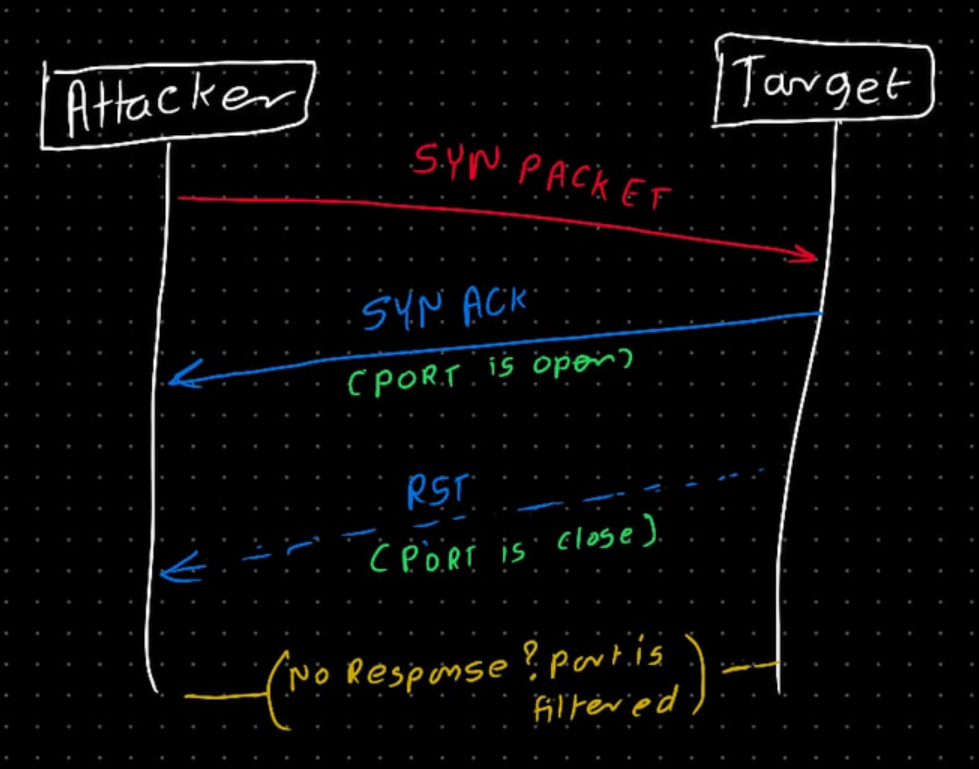
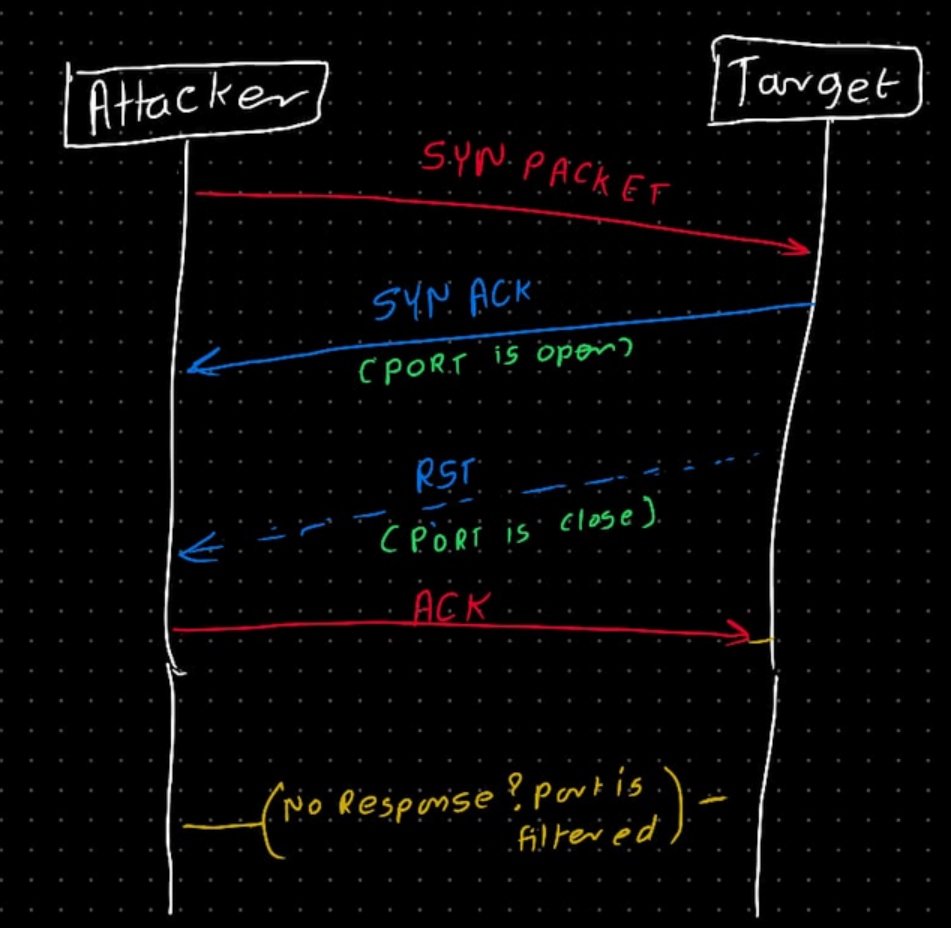
- Attacker send SYN packet
- If target responds with SYN-ACK port is open
- If target responds RST port is closed
- If target does not respond it is filtered indicating firewall is configured for given port
- Let's see this Wireshark
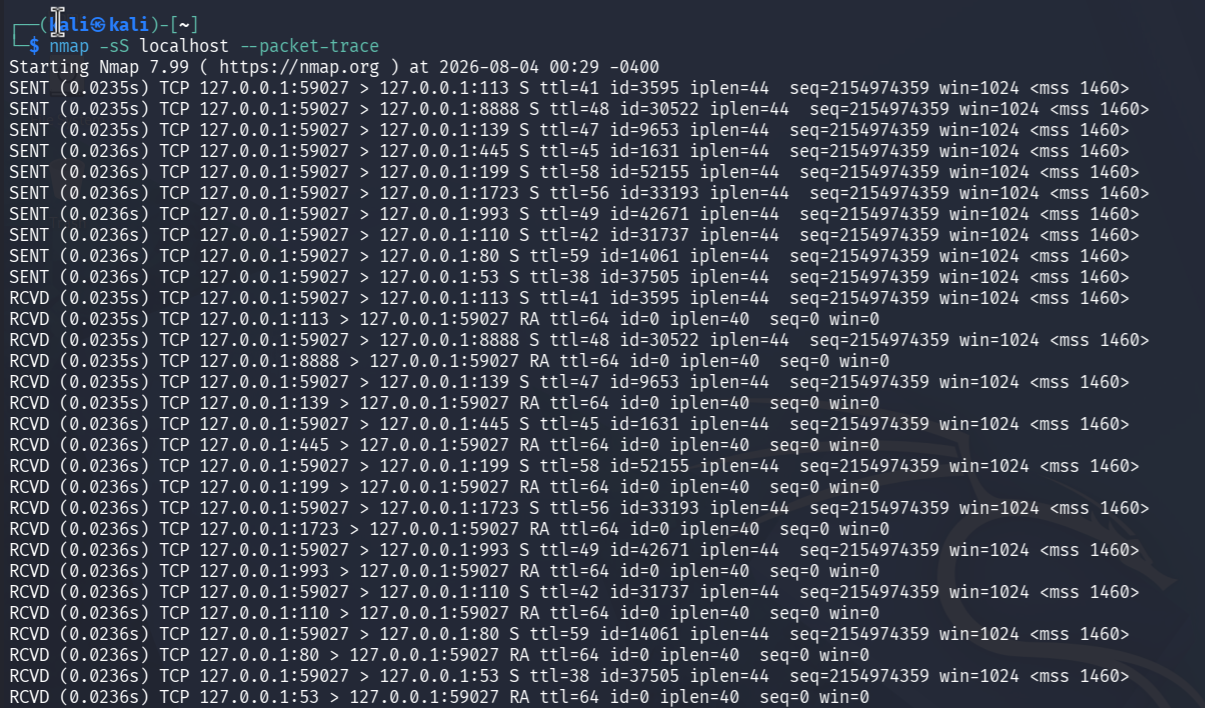
- Using nmap SYN Scan
-sS(--packet-traceis used for more verbose output in terminal)
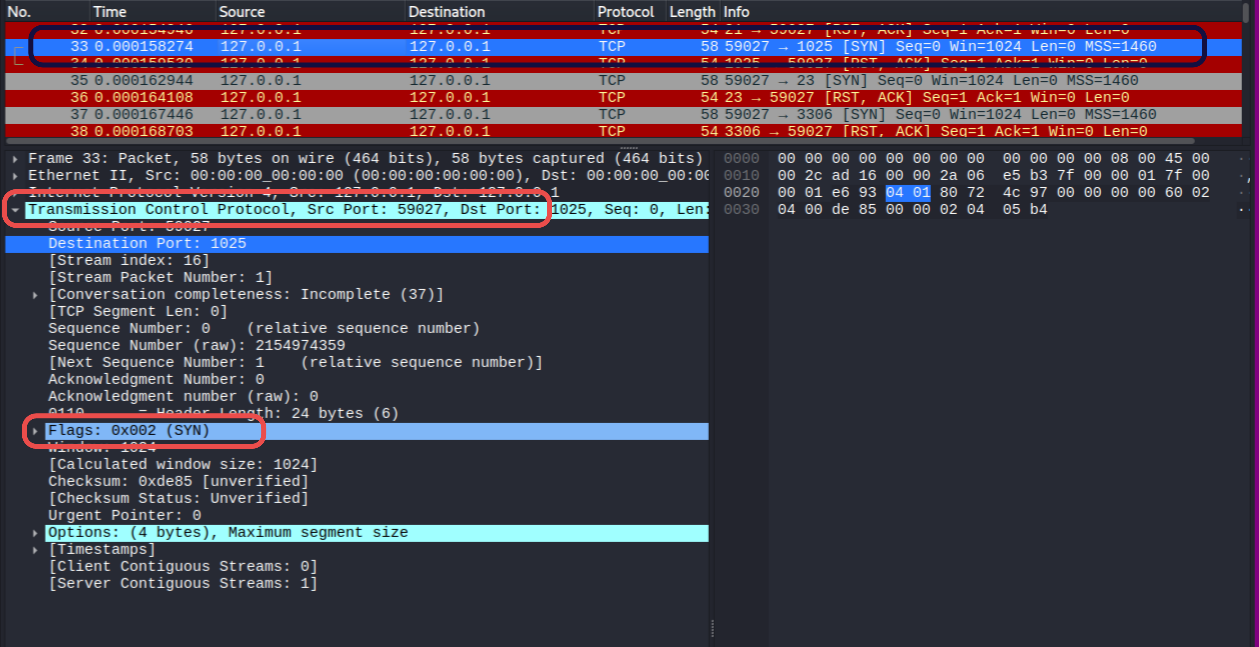
- Below screenshot shows SYN Packet sent by attacker, this includes destination port and SYN flag is set.
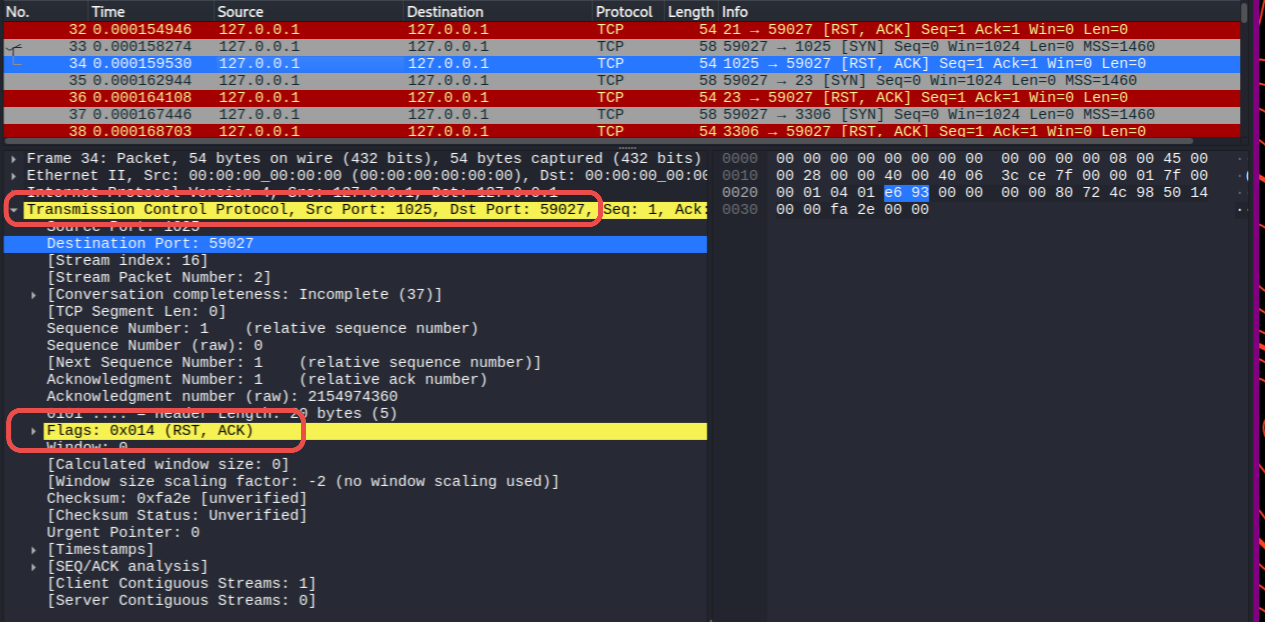
Case 1: Closed Port
- If port is closed we get response packet with RST set
Case 2: Open Port
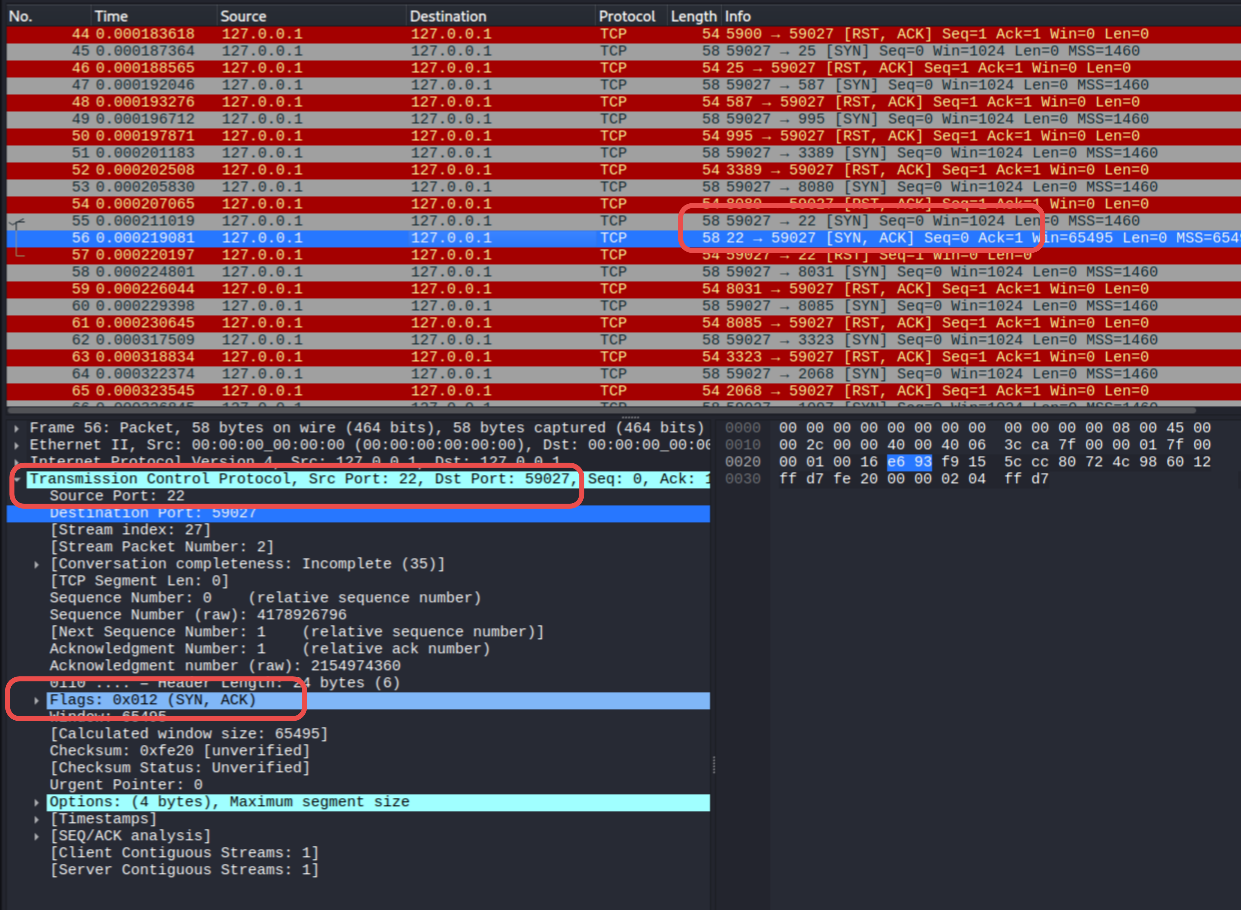
- To open a tcp port (ssh) I used
sudo systemctl start ssh
- If the port is open we get SYN ACK response (In this case source port 22 SSH)
TCP Connect Scan (-sT)
- Performs full TCP 3 way handshake
- Slower than TCP SYN Scan and more noisy
- Let's see it in wireshark
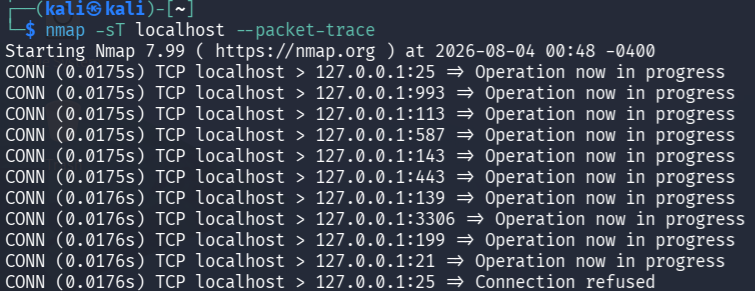
- Using nmap
-sTTCP Connect Scan
- Below is request packet to port 9101
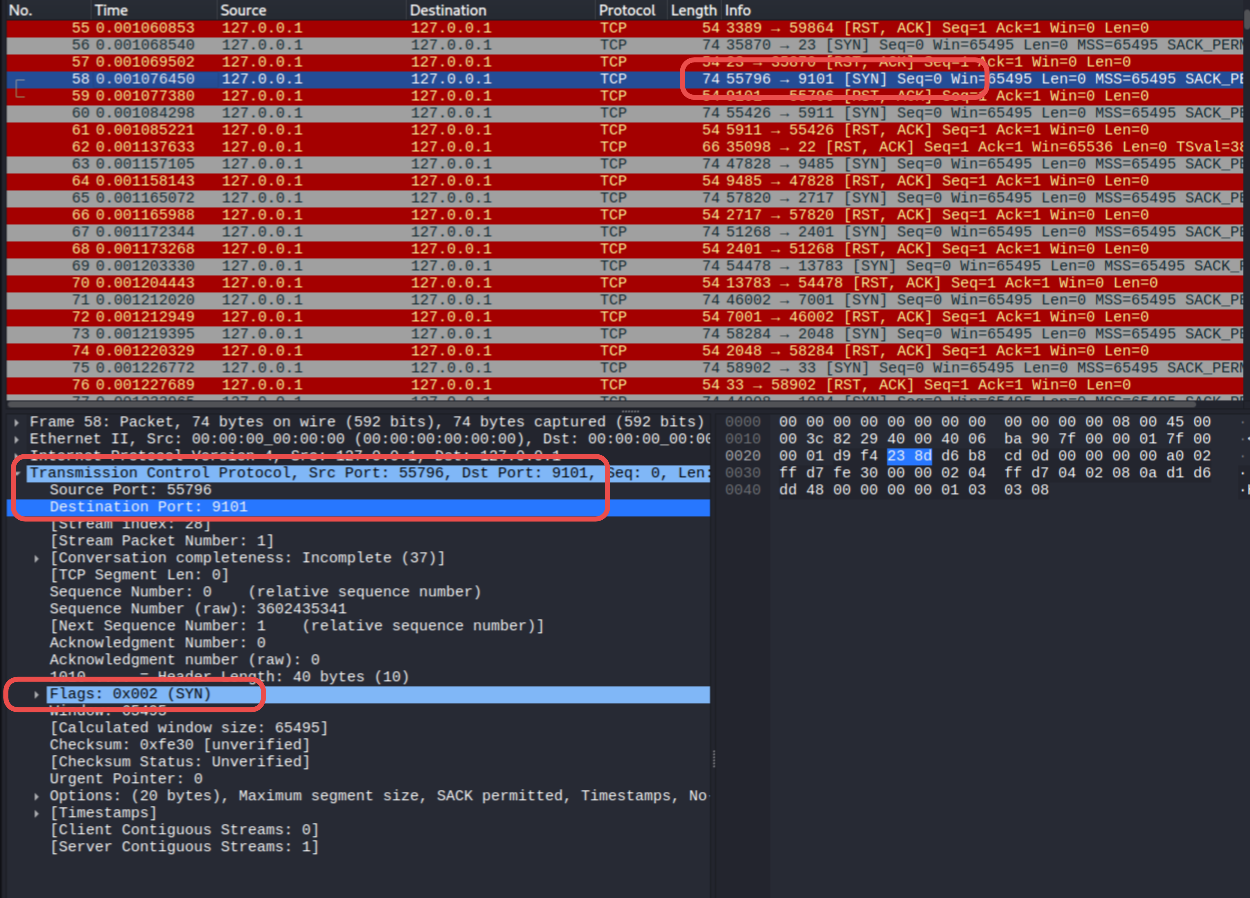
Case 1: Closed Port
- For closed port we see RST Packet response from port 9101
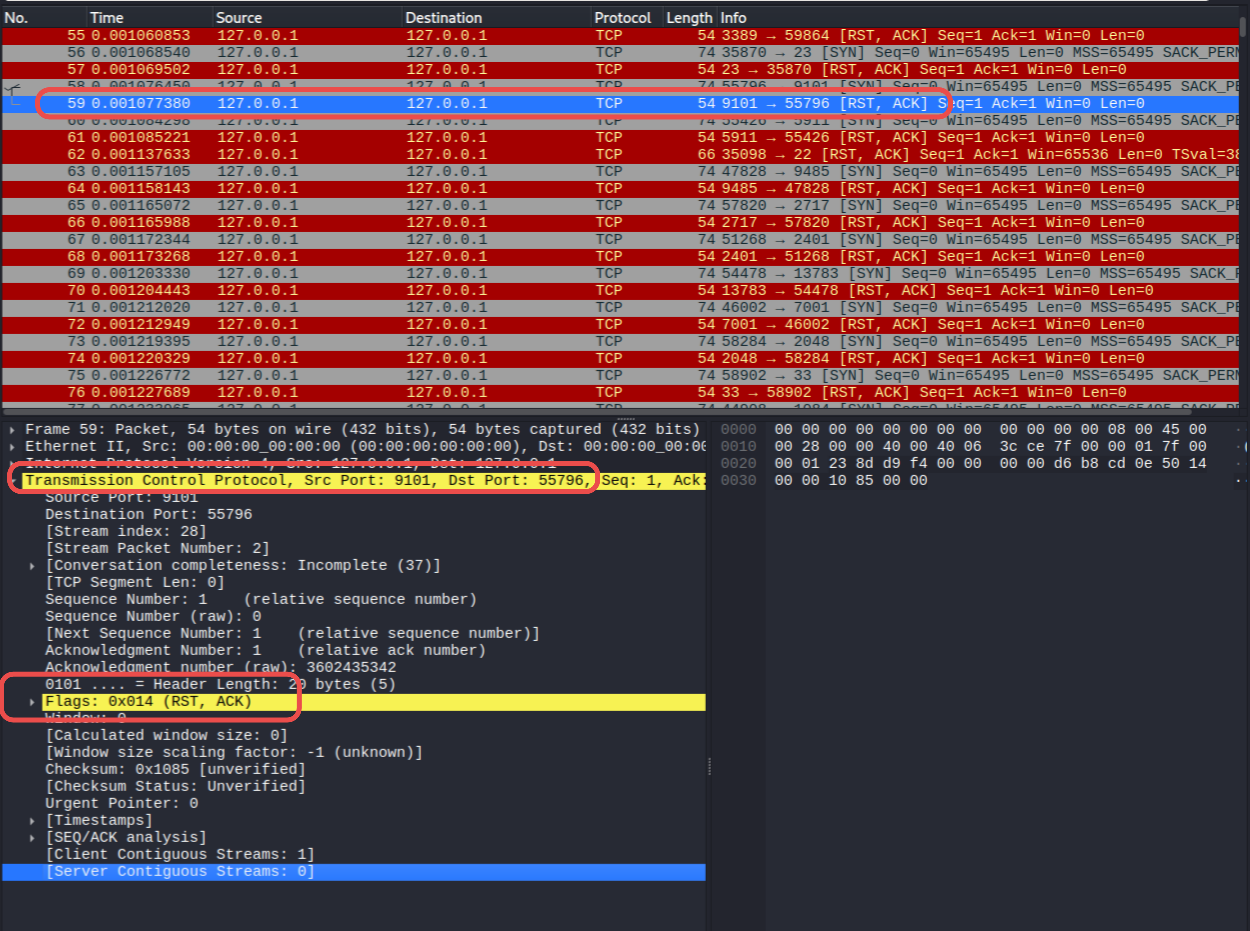
Case 2: Open Port
- For open Packet we get SYN ACK
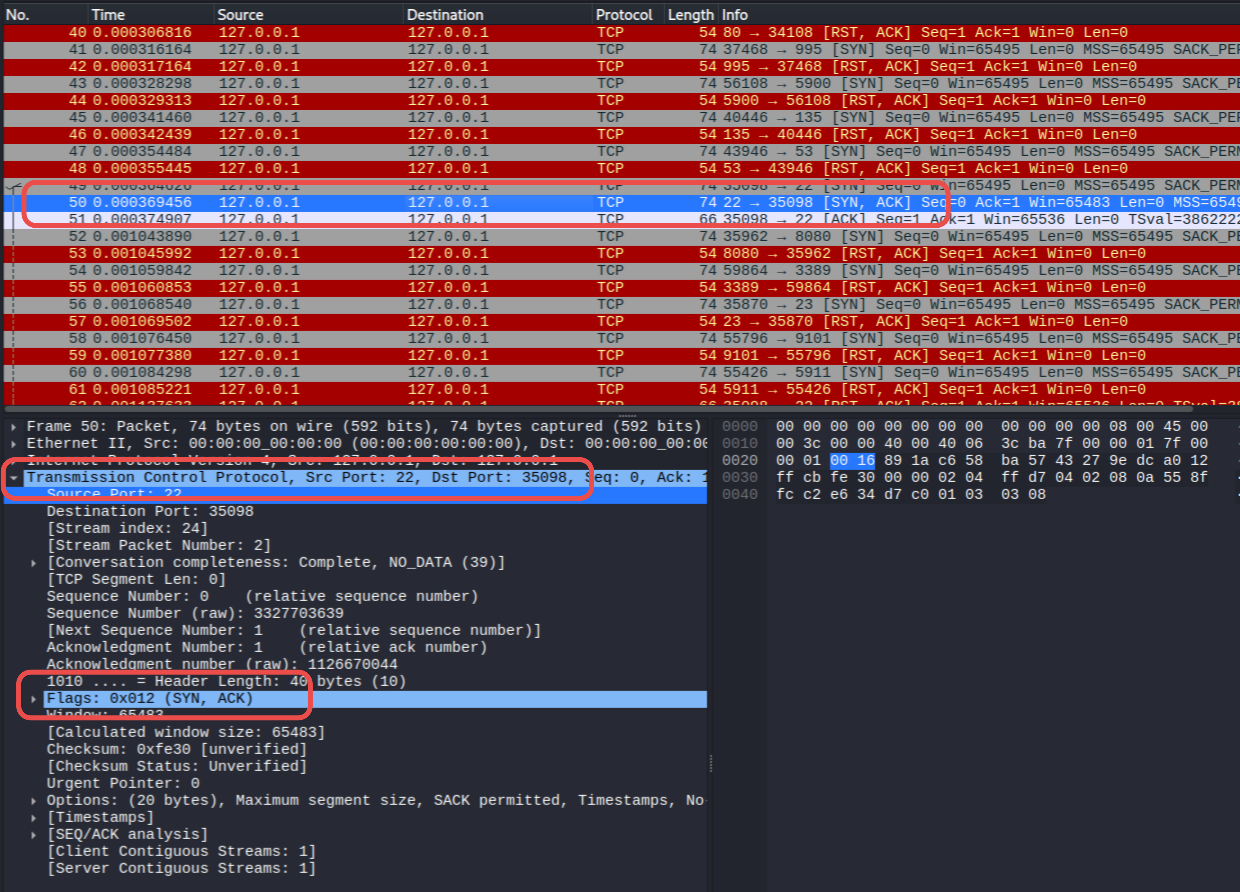
- But Nmap also send ACK packet afterwords in this scan type to complete the 3 way handshake
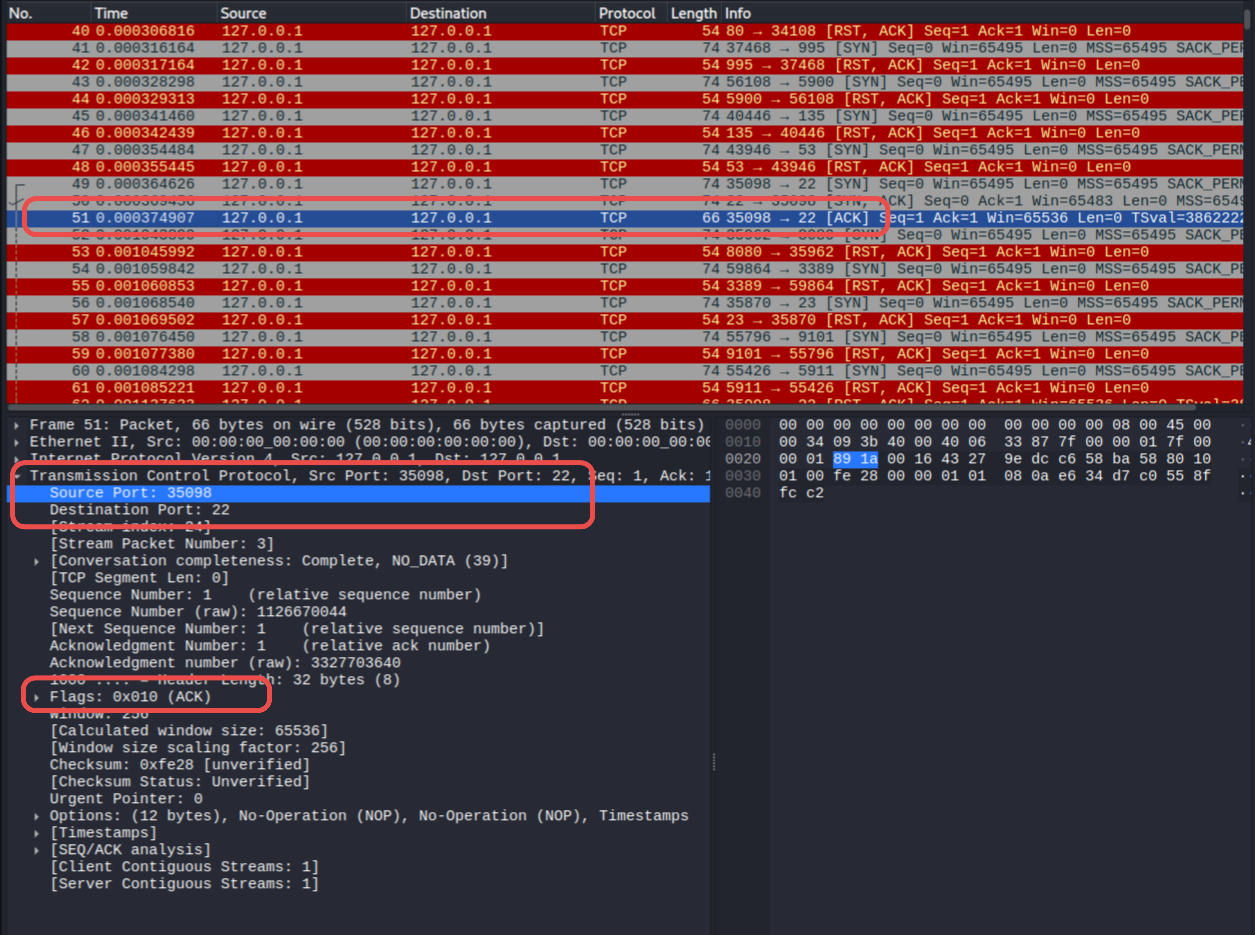
UDP Scan (-sU)
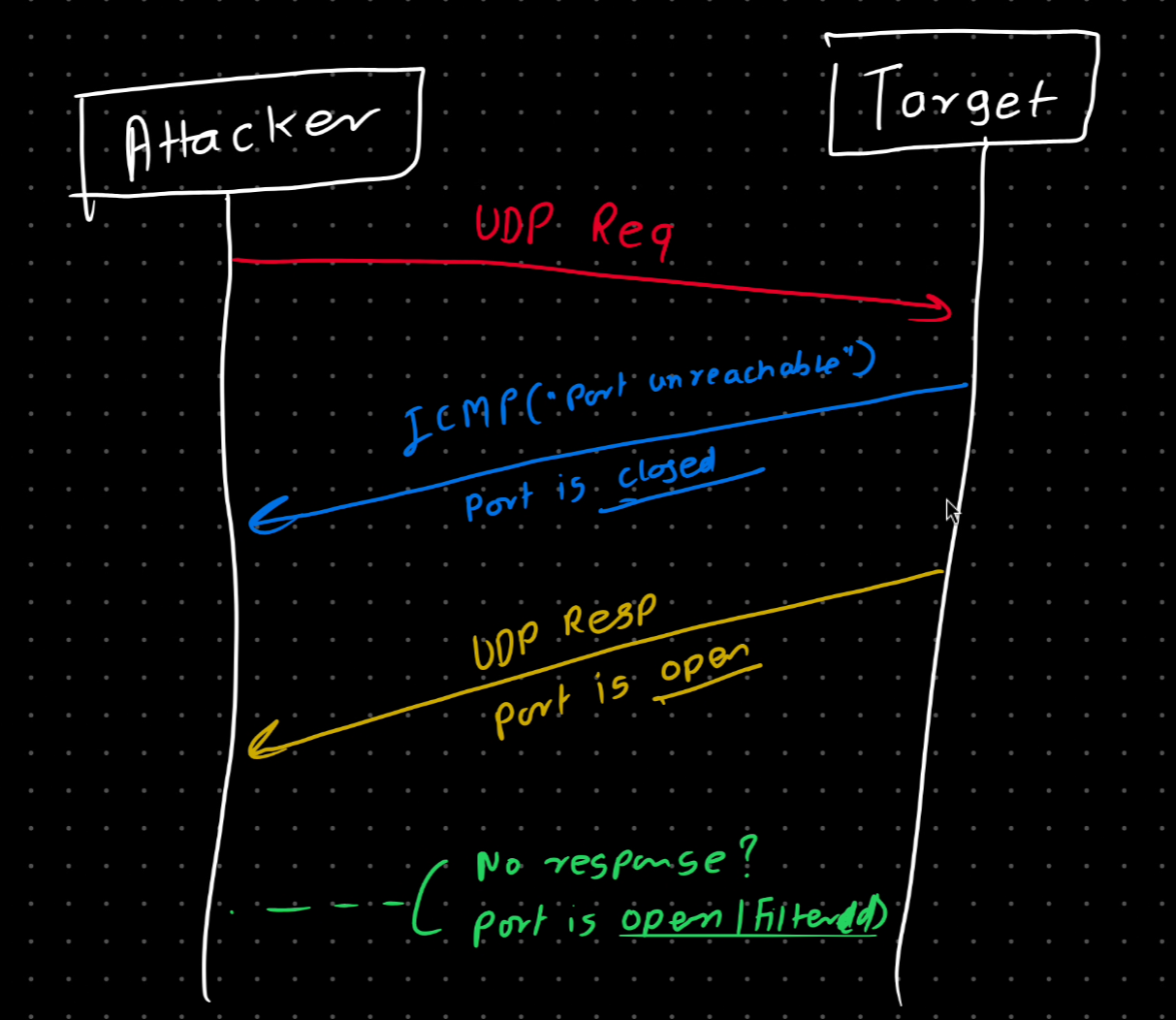
- Attacker sends UDP packets instead TCP
- If no response port is open/filtered
- If ICMP "port unreachable" received port is closed.
- Slower due to lack of response and retries
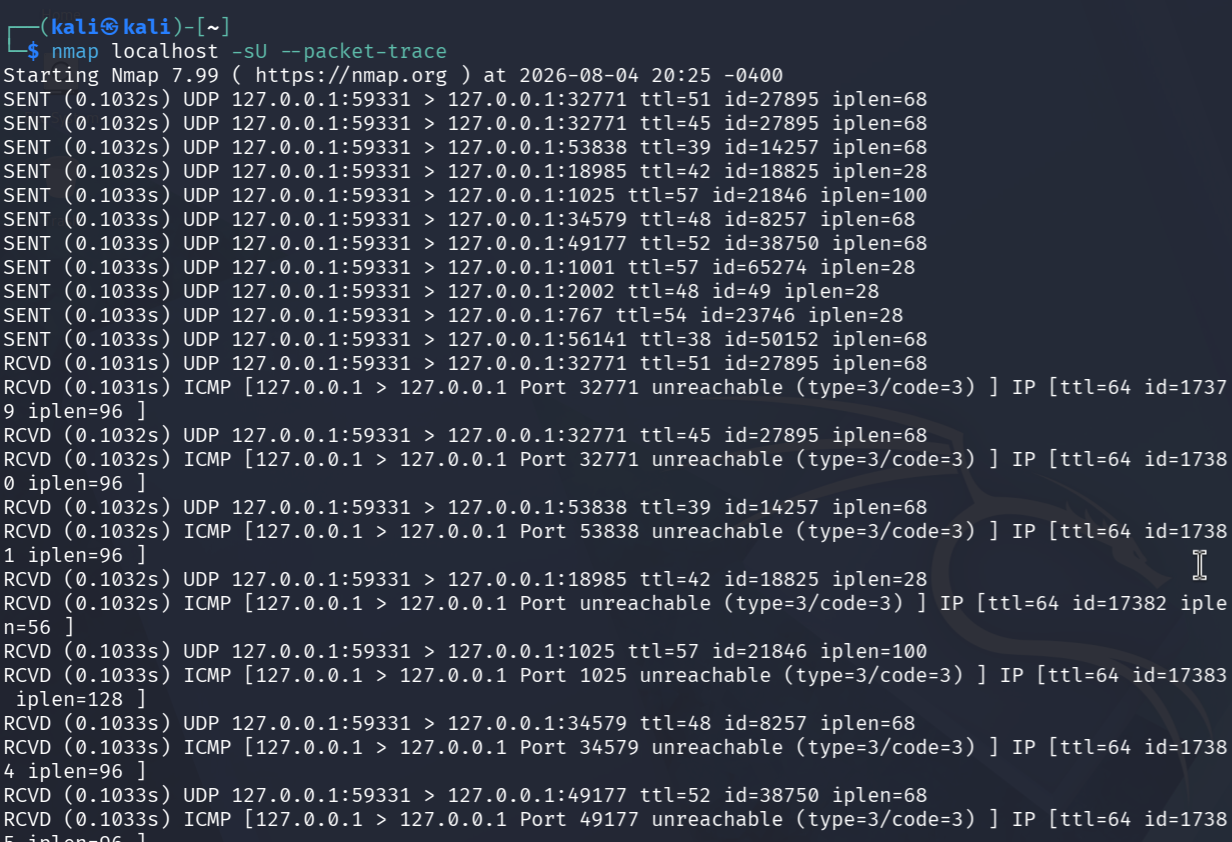
- Let scan using
-sU
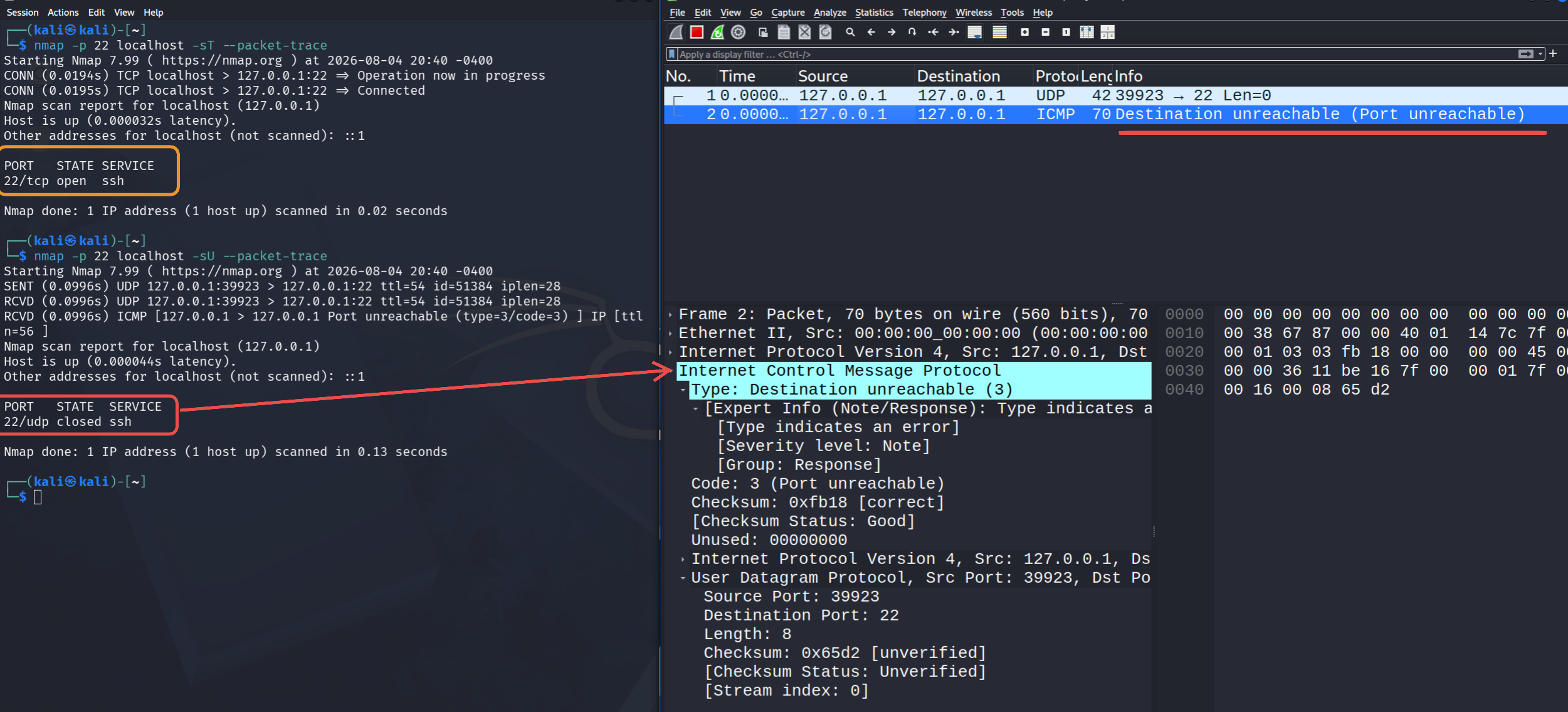
- We see UDP request packet sent by nmap
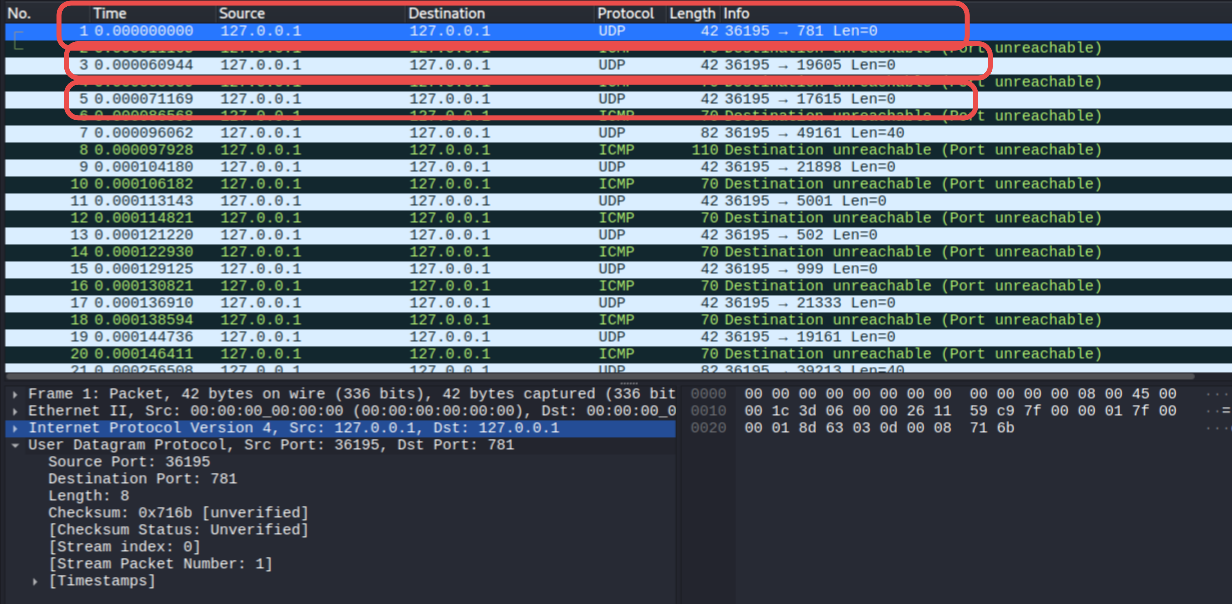
Case 1: Closed Port
- We get ICMP packet with type Destination Unreachable (3)
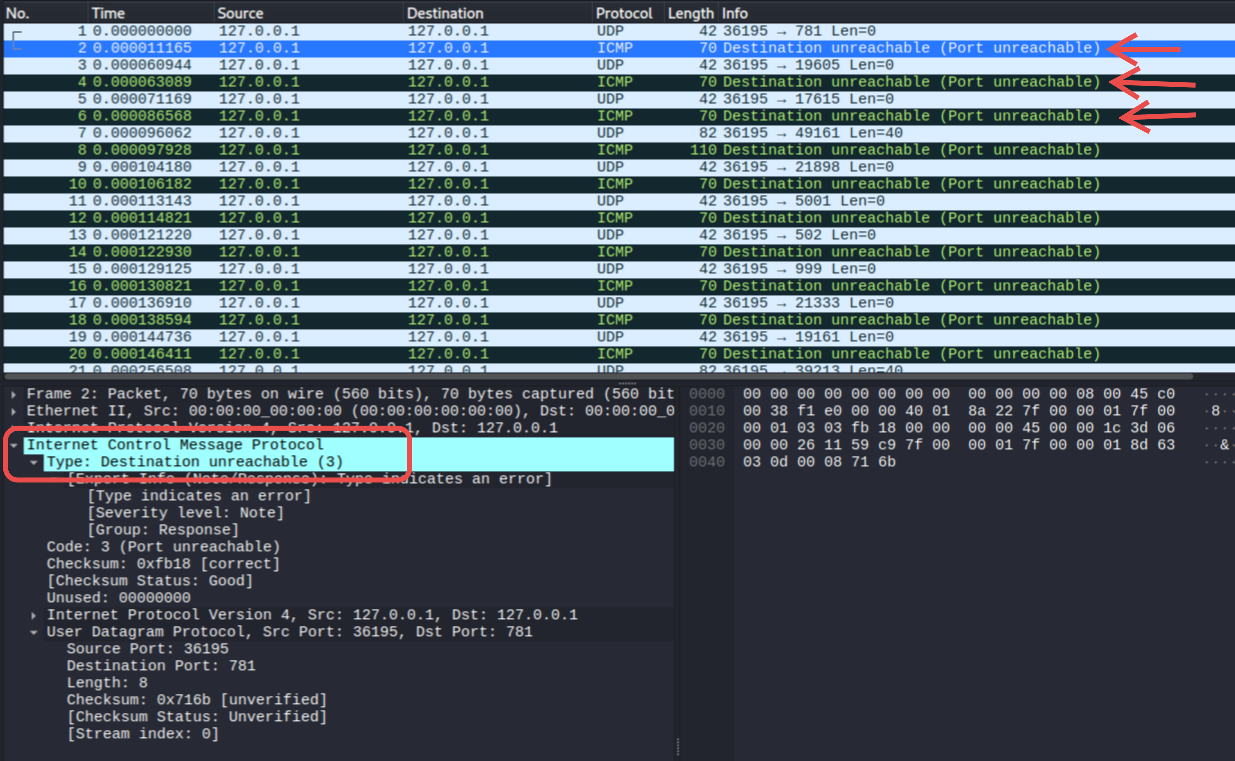
- One important thing to note that if the port uses TCP it may still be shown as closed for example in below case SSH (port 22) is open however UDP Scan will not detect it as SSH uses TCP. Hence Request on SSH on UDP port is responded with ICMP - Destination Unreachable.
Case 2: Open Port
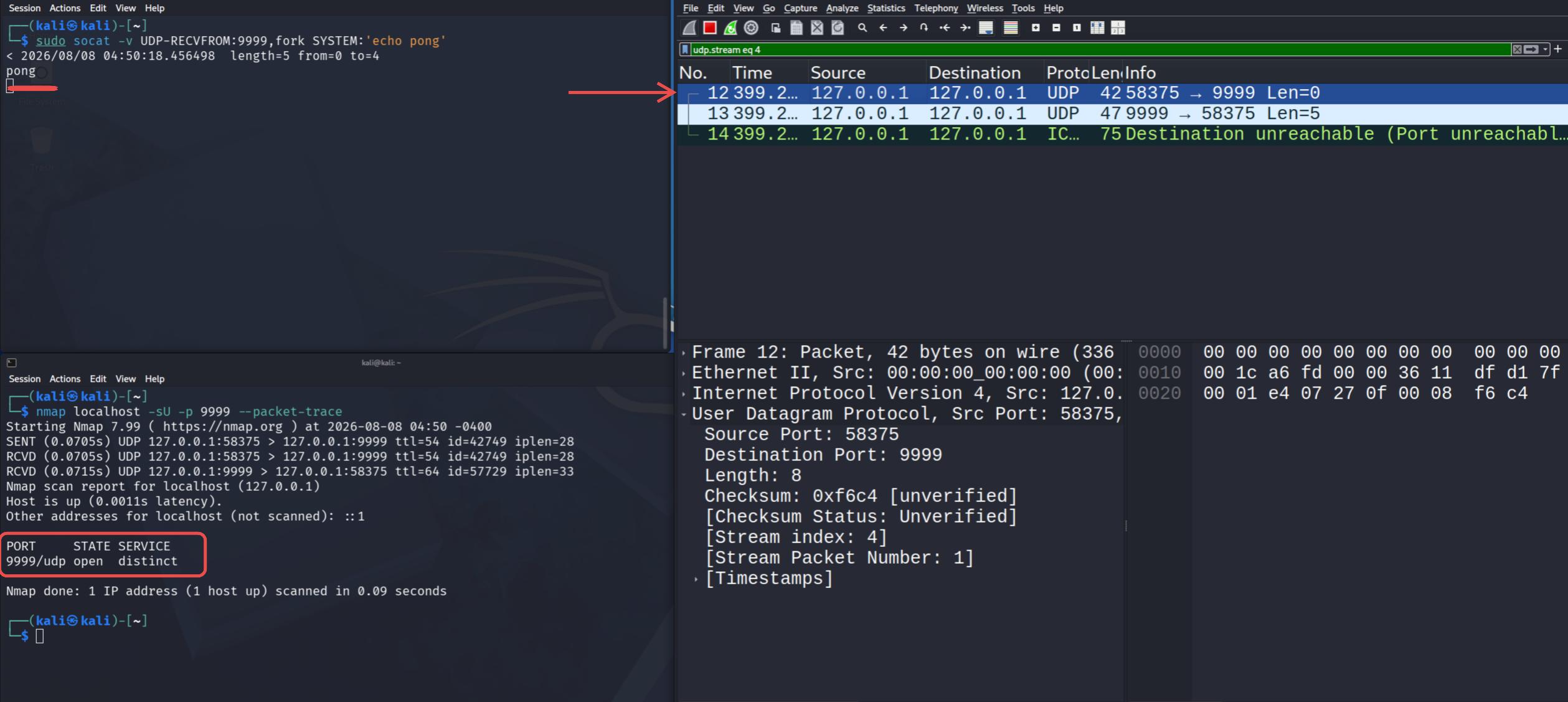
- To open UDP port I used
sudo socat -v UDP-RECVFROM:9999,fork SYSTEM:'echo pong'
- Here we sent the requst but we
ACK Scan (-sA)
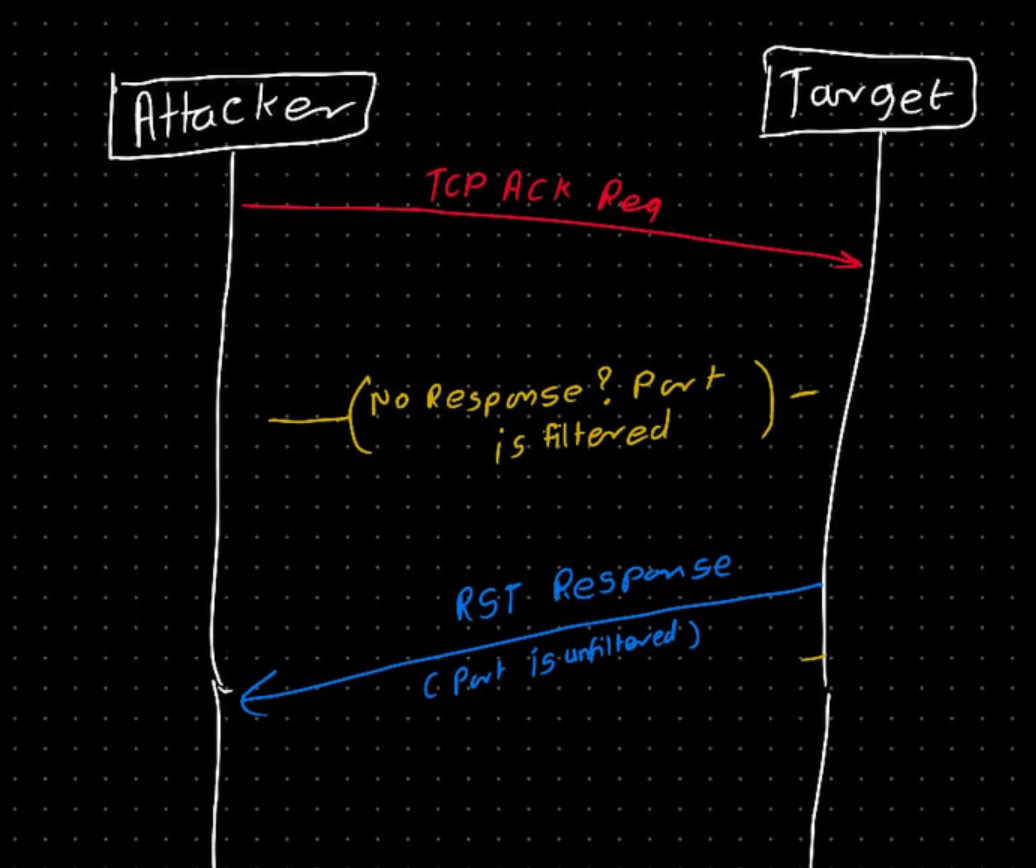
- Used to detect firewall, not to find open ports
- Sends ACK packets
- RST response = unfiltered
- No response / ICMP Unreachable = filtered
- Helps determine if firewall is stateful/stateless
- Let's analyse in Wireshark
Case 1: Unfiltered Port
- Initially there is not firewall rule set and localhost accept all Incoming packets
- Scanning with nmap
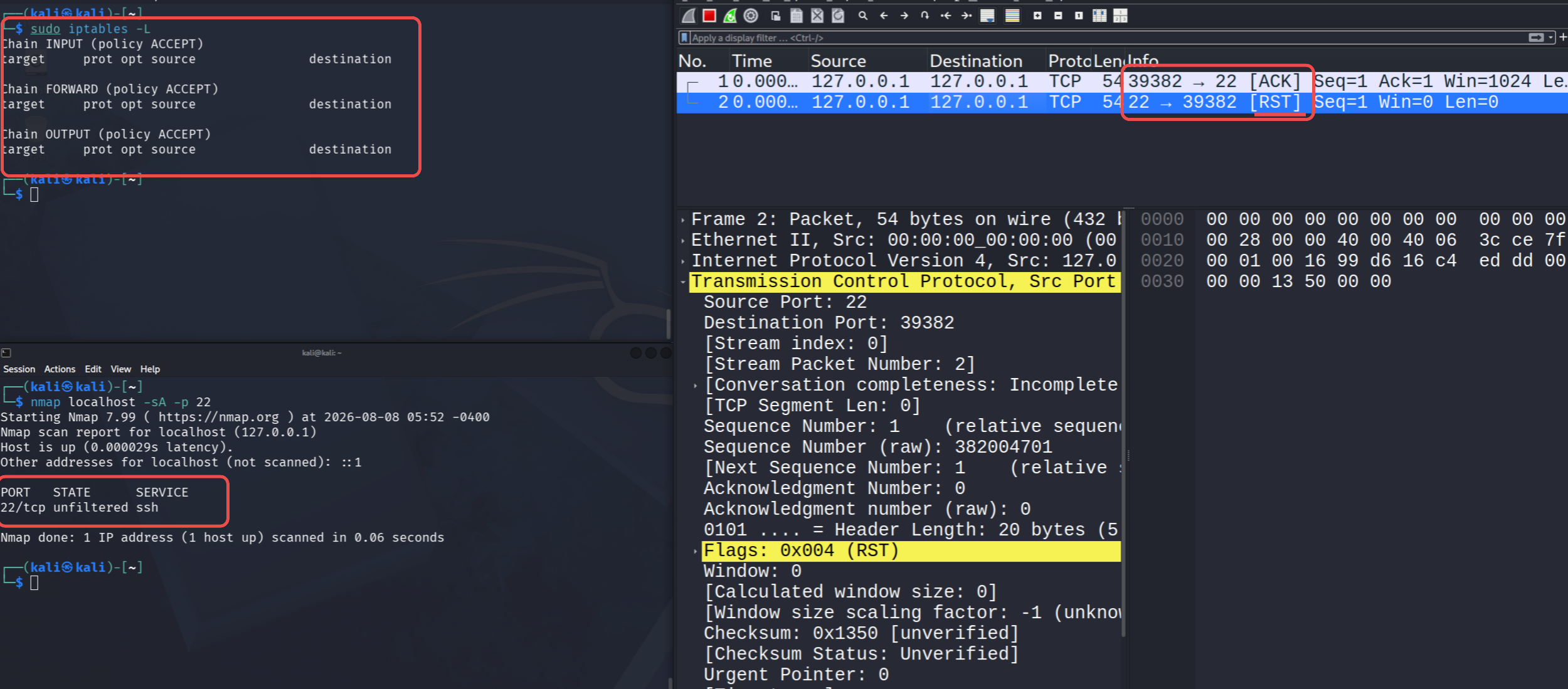
- We get RST in response, meaning there is no firewall set on port 22 (port is unfiltered)
Case 2: Filtered Port
- Adding
iptablesrule to block port 22/tcp
sudo iptables -A INPUT -p tcp --dport 22 -j DROP
- Scanning with nmap
nmap localhost -sA -p 22
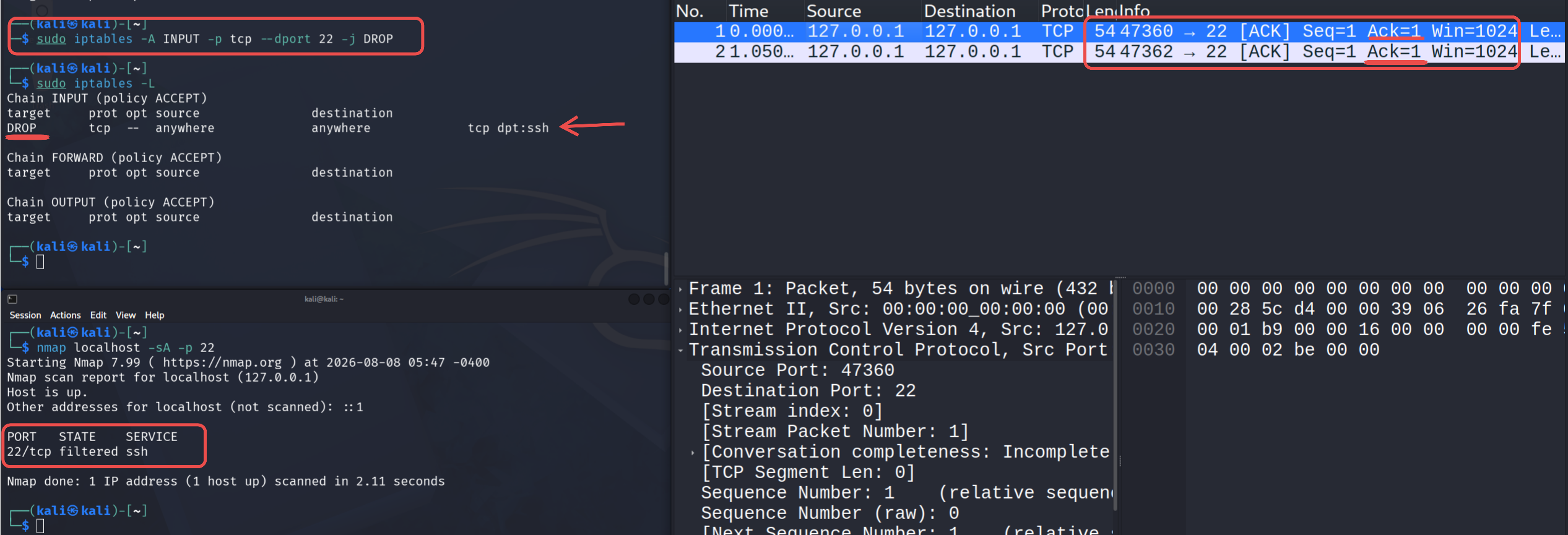
- We didnt get any response.
- Port 22/tcp is shown as filtered as it is blocked by firewall (in this case
iptables)
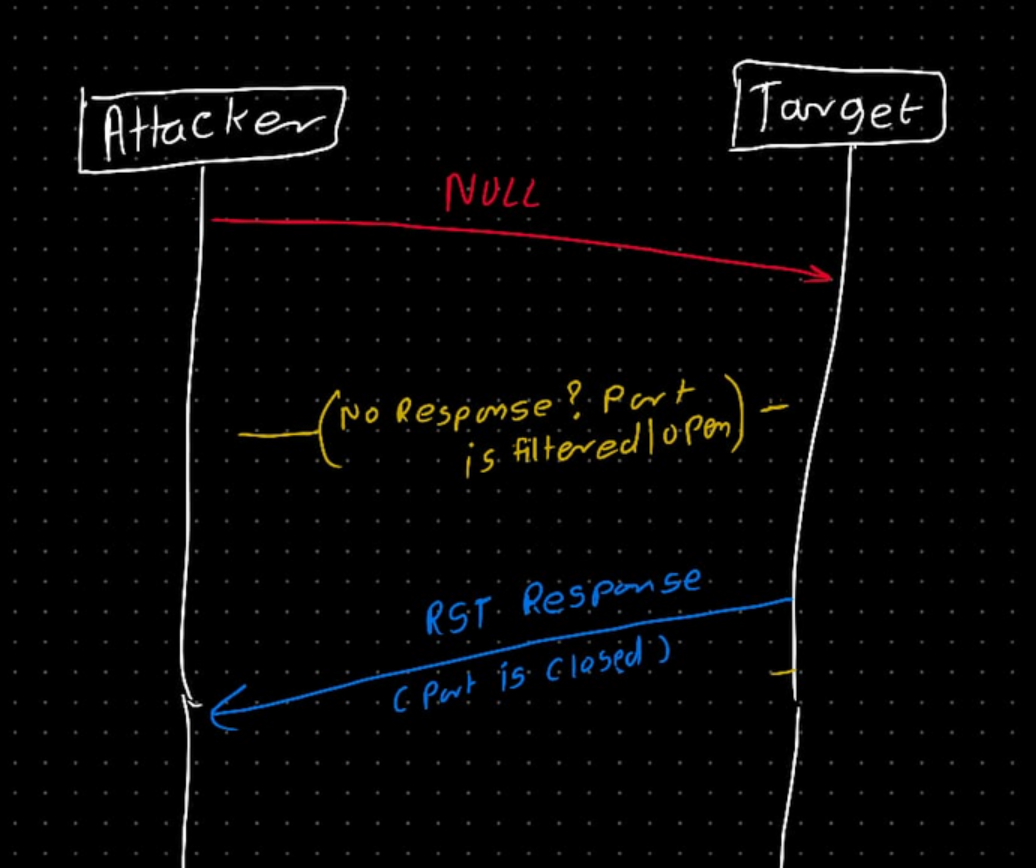
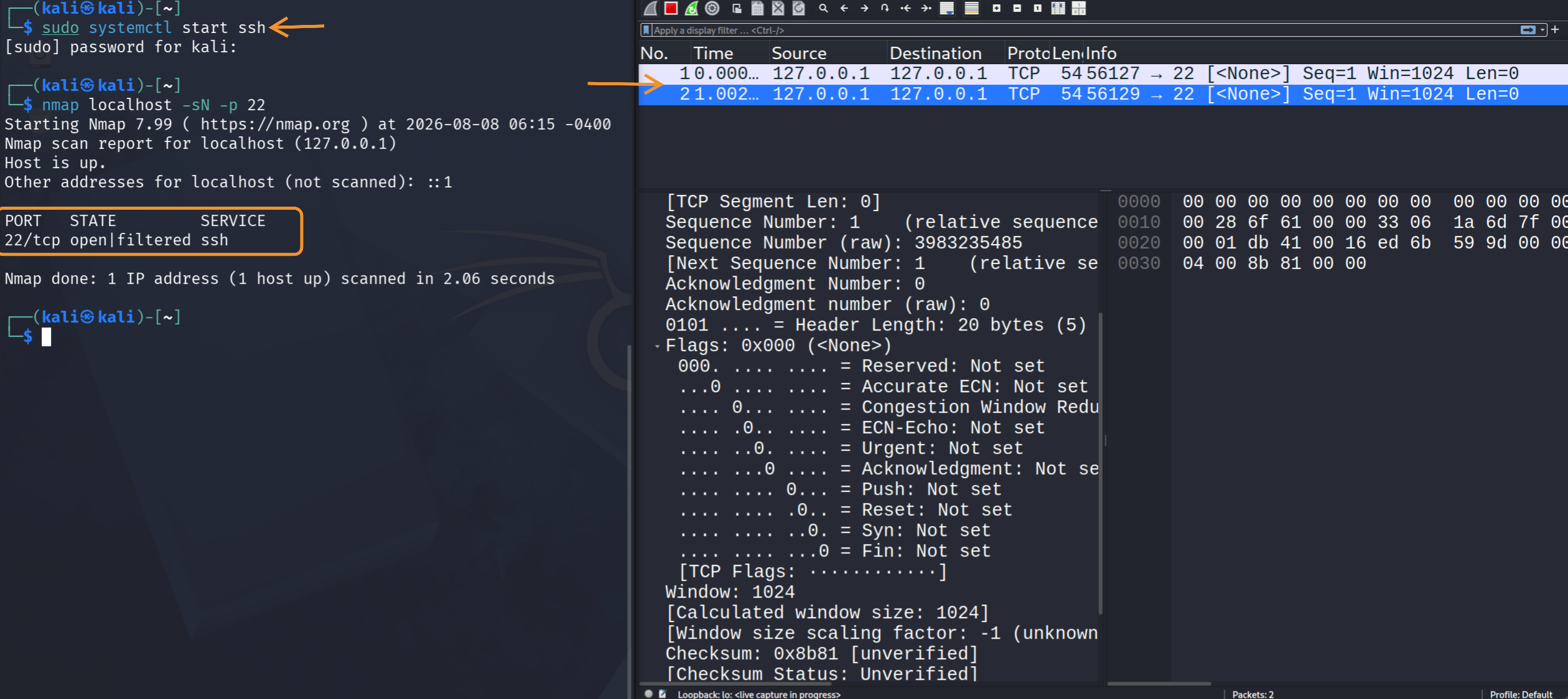
NULL Scan (-sN)
- Sends packets with no flags set
- No response = open|filtered
- RST = closed
- Can bypass some poorly configured firewalls
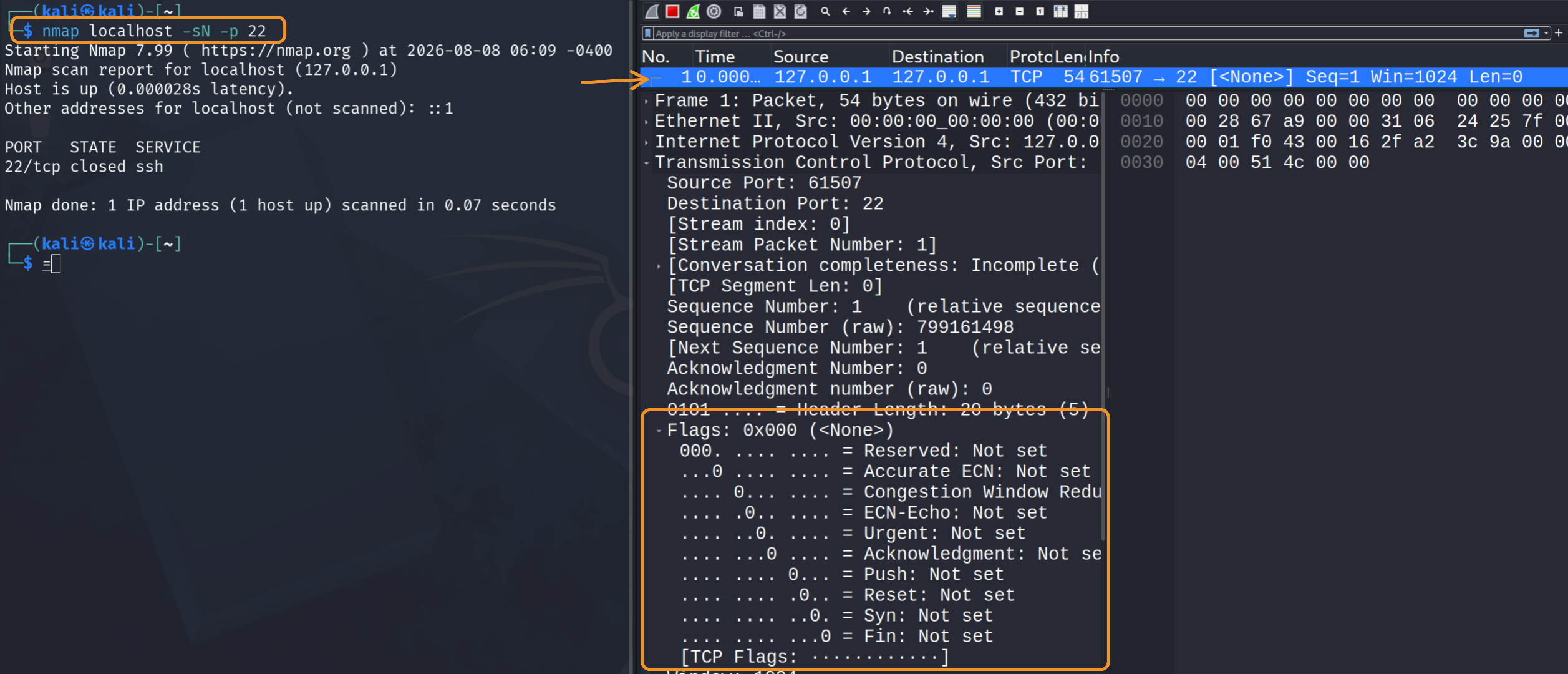
Case 1: Closed Port
- Nmap sends Null packet
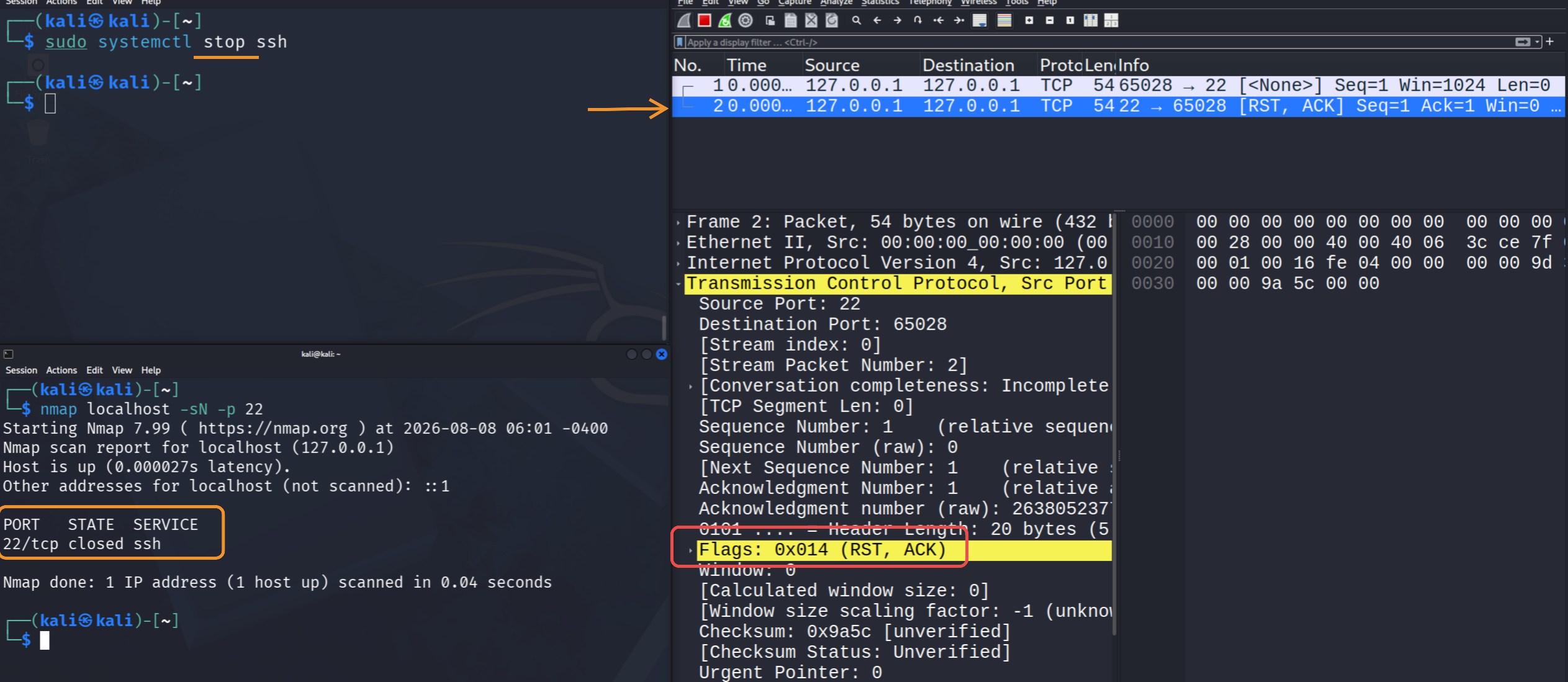
- In response we get Packet with RST flag set meaning the port is closed
Case 2: Open|Filtered Port
- We didn't get RST packet which means the port is open|filtered
Version Scan (-sV)
- Used to find the version (nmap performs banner grabbing)
└─$ nmap localhost --packet-trace -p 22 -sV
Starting Nmap 7.99 ( https://nmap.org ) at 2026-08-08 06:40 -0400
SENT (0.0986s) TCP 127.0.0.1:61824 > 127.0.0.1:22 S ttl=46 id=50704 iplen=44  seq=3578826321 win=1024 <mss 1460>
RCVD (0.0986s) TCP 127.0.0.1:61824 > 127.0.0.1:22 S ttl=46 id=50704 iplen=44  seq=3578826321 win=1024 <mss 1460>
RCVD (0.0986s) TCP 127.0.0.1:22 > 127.0.0.1:61824 SA ttl=64 id=0 iplen=44  seq=267214121 win=65495 <mss 65495>
NSOCK INFO [0.1650s] nsock_iod_new2(): nsock_iod_new (IOD #1)
NSOCK INFO [0.1650s] nsock_connect_tcp(): TCP connection requested to 127.0.0.1:22 (IOD #1) (timeout: 5000ms) EID 8
NSOCK INFO [0.1650s] nsock_trace_handler_callback(): Callback: CONNECT SUCCESS for EID 8 [127.0.0.1:22]
Service scan sending probe NULL to 127.0.0.1:22 (tcp)
NSOCK INFO [0.1650s] nsock_read(): Read request from IOD #1 [127.0.0.1:22] (timeout: 6000ms) EID 18
NSOCK INFO [0.1830s] nsock_trace_handler_callback(): Callback: READ SUCCESS for EID 18 [127.0.0.1:22] (33 bytes): SSH-2.0-OpenSSH_10.3p1 Debian-4..
Service scan hard match (Probe NULL matched with NULL line 3562): 127.0.0.1:22 is ssh.  Version: |OpenSSH|10.3p1 Debian 4|protocol 2.0|
NSOCK INFO [0.1830s] nsock_iod_delete(): nsock_iod_delete (IOD #1)
Nmap scan report for localhost (127.0.0.1)
Host is up (0.000031s latency).
Other addresses for localhost (not scanned): ::1

PORT   STATE SERVICE VERSION
22/tcp open  ssh     OpenSSH 10.3p1 Debian 4 (protocol 2.0)
Service Info: OS: Linux; CPE: cpe:/o:linux:linux_kernel

Service detection performed. Please report any incorrect results at https://nmap.org/submit/ .
Nmap done: 1 IP address (1 host up) scanned in 0.19 seconds
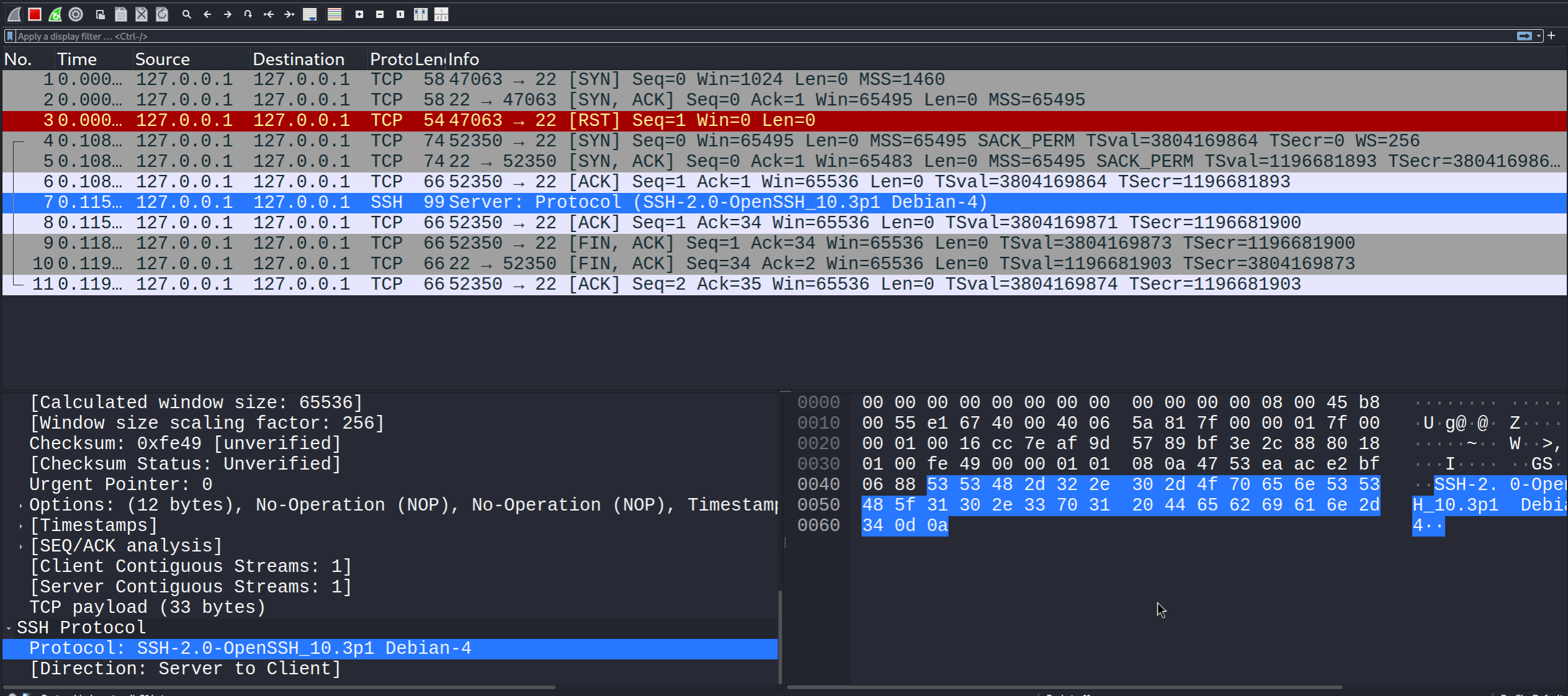
- This is same as netcat brabbing the banner
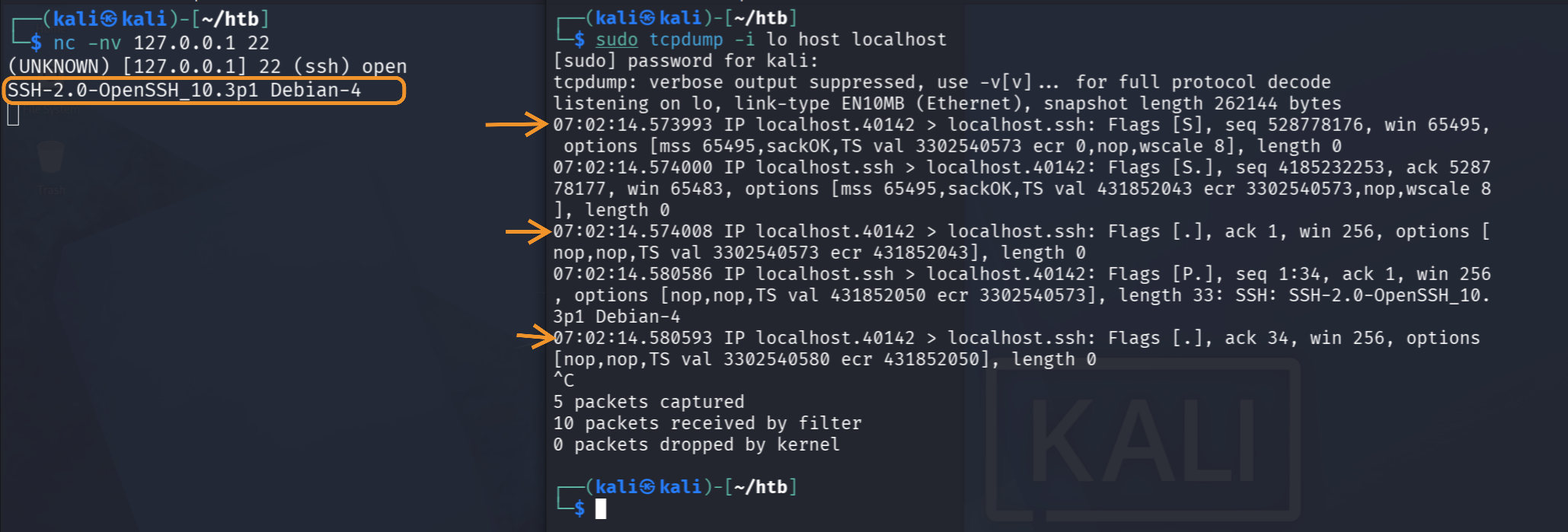
- In this the first 3 line shows tcp 3 way handshake to check if the port is open
07:02:14.573993 IP localhost.40142 > localhost.ssh: Flags [S], seq 528778176, win 65495, options [mss 65495,sackOK,TS val 3302540573 ecr 0,nop,wscale 8], length 0
07:02:14.574000 IP localhost.ssh > localhost.40142: Flags [S.], seq 4185232253, ack 528778177, win 65483, options [mss 65495,sackOK,TS val 431852043 ecr 3302540573,nop,wscale 8], length 0
07:02:14.574008 IP localhost.40142 > localhost.ssh: Flags [.], ack 1, win 256, options [nop,nop,TS val 3302540573 ecr 431852043], length 0
- In below first is request is to ask what is version and response is the banner.
07:02:14.580586 IP localhost.ssh > localhost.40142: Flags [P.], seq 1:34, ack 1, win 256, options [nop,nop,TS val 431852050 ecr 3302540573], length 33: SSH: SSH-2.0-OpenSSH_10.3p1 Debian-4
07:02:14.580593 IP localhost.40142 > localhost.ssh: Flags [.], ack 34, win 256, options [nop,nop,TS val 3302540580 ecr 431852050], length 0
Store Results
- 3 formats
-oN: Normal text format (same as the output)-oX: XML format-oG: Grepable format
- Use
-oAto store results in all 3 formats
┌──(kali㉿kali)-[~/htb]
└─$ nmap localhost -p- -oA nmap
Starting Nmap 7.99 ( https://nmap.org ) at 2026-08-08 06:48 -0400
Nmap scan report for localhost (127.0.0.1)
Host is up (0.0000020s latency).
Other addresses for localhost (not scanned): ::1
Not shown: 65534 closed tcp ports (reset)
PORT   STATE SERVICE
22/tcp open  ssh

Nmap done: 1 IP address (1 host up) scanned in 0.35 seconds
- Check the result
┌──(kali㉿kali)-[~/htb]
└─$ ls
nmap.gnmap  nmap.nmap  nmap.xml
- stored in normal text
┌──(kali㉿kali)-[~/htb]
└─$ cat nmap.nmap
# Nmap 7.99 scan initiated Sat Aug  8 06:48:47 2026 as: /usr/lib/nmap/nmap --privileged -p- -oA nmap localhost
Nmap scan report for localhost (127.0.0.1)
Host is up (0.0000020s latency).
Other addresses for localhost (not scanned): ::1
Not shown: 65534 closed tcp ports (reset)
PORT   STATE SERVICE
22/tcp open  ssh

# Nmap done at Sat Aug  8 06:48:47 2026 -- 1 IP address (1 host up) scanned in 0.35 seconds
- stored in xml format
┌──(kali㉿kali)-[~/htb]
└─$ cat nmap.xml
<?xml version="1.0" encoding="UTF-8"?>
<!DOCTYPE nmaprun>
<?xml-stylesheet href="file:///usr/share/nmap/nmap.xsl" type="text/xsl"?>
<!-- Nmap 7.99 scan initiated Sat Aug 8 06:48:47 2026 as: /usr/lib/nmap/nmap --privileged -p- -oA nmap localhost -->
<nmaprun scanner="nmap" args="/usr/lib/nmap/nmap --privileged -p- -oA nmap localhost" start="1786186127" startstr="Sat Aug 8 06:48:47 2026" version="7.99" xmloutputversion="1.05">
<scaninfo type="syn" protocol="tcp" numservices="65535" services="1-65535"/>
<verbose level="0"/>
<debugging level="0"/>
<host starttime="1786186127" endtime="1786186127"><status state="up" reason="localhost-response" reason_ttl="0"/>
<address addr="127.0.0.1" addrtype="ipv4"/>
<hostnames>
<hostname name="localhost" type="user"/>
<hostname name="localhost" type="PTR"/>
</hostnames>
<ports><extraports state="closed" count="65534">
<extrareasons reason="reset" count="65534" proto="tcp" ports="1-21,23-65535"/>
</extraports>
<port protocol="tcp" portid="22"><state state="open" reason="syn-ack" reason_ttl="64"/><service name="ssh" method="table" conf="3"/></port>
</ports>
<times srtt="2" rttvar="0" to="100000"/>
</host>
<runstats><finished time="1786186127" timestr="Sat Aug 8 06:48:47 2026" summary="Nmap done at Sat Aug 8 06:48:47 2026; 1 IP address (1 host up) scanned in 0.35 seconds" elapsed="0.35" exit="success"/><hosts up="1" down="0" total="1"/>
</runstats>
</nmaprun>
- Stored in grepable format
┌──(kali㉿kali)-[~/htb]
└─$ cat nmap.gnmap
# Nmap 7.99 scan initiated Sat Aug  8 06:48:47 2026 as: /usr/lib/nmap/nmap --privileged -p- -oA nmap localhost
Host: 127.0.0.1 (localhost)     Status: Up
Host: 127.0.0.1 (localhost)     Ports: 22/open/tcp//ssh///      Ignored State: closed (65534)
# Nmap done at Sat Aug  8 06:48:47 2026 -- 1 IP address (1 host up) scanned in 0.35 seconds
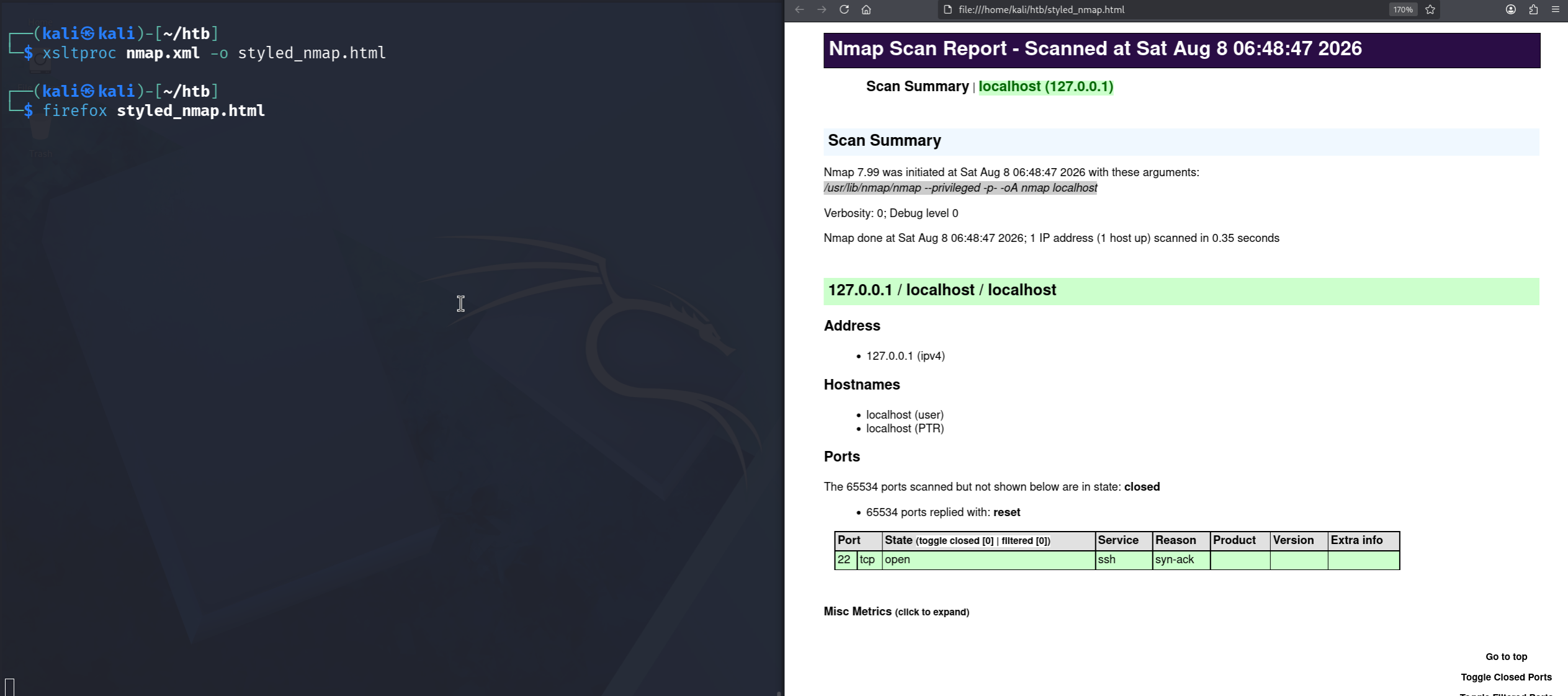
- To document we can style xml file using
xsltproc
xsltproc nmap.xml -o styled_nmap.html
Nmap Scripts Scan
- Below is the syntax to use scripts
nmap <ip> --script <category>
- Below are the categories of nmap scripts
| Category | Purpose |
|---|---|
auth | Checks or bypasses authentication (e.g., weak login methods). |
broadcast | Discovers hosts/services by sending broadcast requests on the network. |
brute | Attempts password guessing using brute-force techniques. |
default | Safe and commonly useful scripts run with -sC. |
discovery | Gathers information about hosts, services, or the network. |
dos | Tests if a service can be crashed or made unavailable (can be risky). |
exploit | Tries known vulnerabilities to gain access or control. |
external | Uses third-party services (like WHOIS, DNS) for extra info. |
fuzzer | Sends random/malformed inputs to find bugs or crashes. |
intrusive | More aggressive scripts that may affect the target system. |
malware | Detects signs of malware or infected systems. |
safe | Non-intrusive scripts that won’t disrupt normal operations. |
version | Helps identify service versions and details. |
vuln | Checks for known security vulnerabilities. |
# nmap -sC -sV --script=vuln,auth 192.168.1.10

Starting Nmap 7.94 ( https://nmap.org ) at 2026-08-08

Nmap scan report for 192.168.1.10
PORT    STATE SERVICE VERSION
22/tcp  open  ssh     OpenSSH 7.6p1 Ubuntu
| ssh-auth-methods:
|   Supported authentication methods:
|     publickey
|     password
|_  Potential brute-force target (password auth enabled)

80/tcp  open  http    Apache httpd 2.4.29
| http-title: Apache2 Ubuntu Default Page
|_Requested resource was /index.html
| http-server-header: Apache/2.4.29 (Ubuntu)

| http-vuln-cve2017-5638:
|   VULNERABLE:
|   Apache Struts Remote Code Execution
|     State: VULNERABLE
|     Risk factor: HIGH
|     Description:
|       Target may be vulnerable to remote command execution.
|_    References: CVE-2017-5638

445/tcp open  smb     Samba smbd 4.7.6-Ubuntu
| smb-vuln-ms17-010:
|   VULNERABLE:
|   EternalBlue vulnerability
|     State: VULNERABLE
|     Risk factor: CRITICAL
|_    Exploitable via crafted packets

| smb-enum-shares:
|   account_used: guest
|   \\192.168.1.10\public
|_    READ access

Service detection performed. Please report any incorrect results.
Nmap done: 1 IP address (1 host up) scanned in 35.12 seconds
Speed optimisation
- There are flags to increase the speed (at the cost of reliability) of the output generally by reducing timeout, max retries, rate or increasing parrallel tasks.
| Flag | What it Controls | What it Does | When to Use |
|---|---|---|---|
| -T <0-5> | Scan speed profile | Predefined speed levels from very slow (stealthy) to extremely fast (noisy) | Use -T4 for most cases, -T5 only in trusted networks |
| --initial-rtt-timeout | First response wait time | How long Nmap waits for a reply initially before assuming delay | Lower it to speed up scans on fast networks |
| --max-rtt-timeout | Max response wait time | Upper limit Nmap will wait for responses from targets | Reduce it to avoid wasting time on slow/non-responsive hosts |
| --max-retries | Retry attempts | Number of times Nmap resends packets if no response | Set to 0 for speed, higher for reliability |
| --min-rate <num> | Packet sending speed | Forces Nmap to send at least X packets per second | Increase in high-bandwidth/internal tests |
| --min-parallelism <num> | Parallel probes | Minimum number of simultaneous probes running | Increase to speed up scans on stable networks |
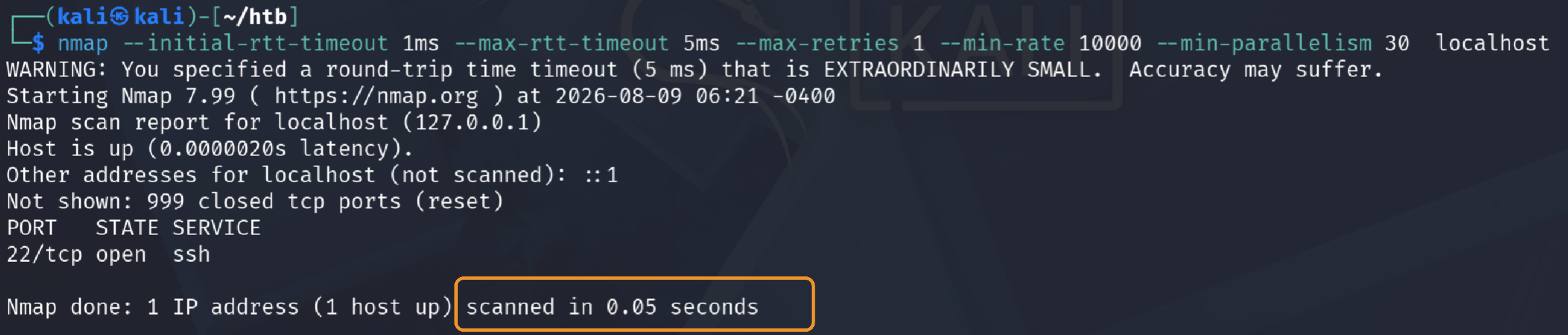
- Without any speed optimisation it took 0.11 seconds
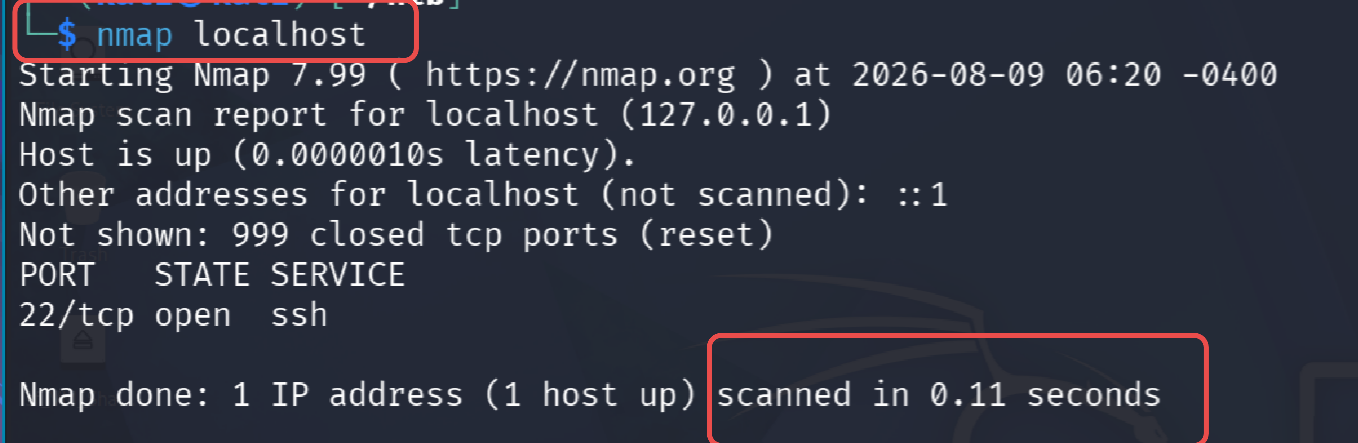
- With optimisation it took
nmap --initial-rtt-timeout 1ms --max-rtt-timeout 5ms --max-retries 1 --min-rate 10000 --min-parallelism 30 localhost